How To Fix The Red Ring Of Death?
Today I received an interesting email from a Gamers World Bangladesh Blog reader. He just had the red ring of death. Here’s his original email:
Hi,
I am one of the few Xbox Live! players in Bangladesh. Anyways to the point, my 360 got that red ring. Now, what should I do?
Adnan Ahmed
A PERMANENT FIX
The insides of your 360 is delicate and require special handling. That is why, I recommend this step-by-step guide on how to disassemble, repair and put it back together again in less than an hour. Plus, it has all the instructions in video format. I urge everyone to check it out.

I have a lot of friends who have the dreaded Xbox 360 Red Ring of Death. It’s every Bangladeshi gamers nightmare. Since almost all of us buy modded consoles with no warranty, and run cheap pirated discs, the Xbox 360 develops problems over time. Since the warranty isn’t intact, and even if it is, we don’t have an authorized Microsoft repair center to have it fixed for free. So what to do in this case?
DO YOU REALLY HAVE THE RED RING OF DEATH?
 One of the first things to do is to check whether you have the red ring of death. Each quadrant on the set of flashing red lights indicates a different issue. The red ring of death is when your Xbox 360 shows 3 red lights in the upper left quadrants. Check with the screen shot to the left which shows a red ring of death.
THE FIX
I’ve read that you can fix the red ring of death by simply wrapping towels around it. I don’t know if this works, or if it leads to problems later on, but you could try it. Here’s the instruction from an editor of Xbox 360 Rally who had the same problem:
Put one towel down, put the 360 on top, add another towel on top, cover all sides/backs/etc. This is key, you have to have that Xbox covered. When you can’t see it, finger around to find the power button and turn it on. Wait 10-15 minutes. Turned back on, I got a chubby when all I seen was green lights. I turned off the system to put back in the hard drive and throw in a game.
Here’s a video tutorial:

MORE ADVANCED FIX
If that didn’t work for you, then you could try the method listed at Instruction Tables. But it’s for advanced users only as you have to take the console apart, and possibly void your warranty.
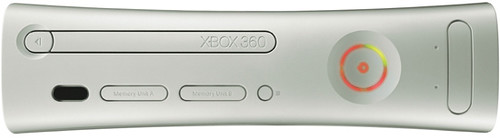
IF YOU DON’T HAVE THE RED RING OF DEATH
If all of the lights but the first section are flashing, this means a general hardware failure has occurred. There is little to be done other than trying to unhook and reattach your cables. This problem is a sure sign a visit to the repair center is in your console’s future. If the problem is indicated in the second quadrant of the system, it is merely overheating. As too many hours of GRAW will do that to a unit, the proposed cure here is to unplug the unit from the power supply, let it sit to cool down, and perhaps begin scouting for a better location to store your precious investment.
A problem indicated in the third quadrant of the Xbox 360 ring of light is diagnosed as a hardware failure. Once again, try re-inserting all of your cords and cables, but this problem should definitely be dealt with by the repair center. If all four lights are flashing on the front of your console, this is perhaps the easiest problem to fix. This is an issue with the AV cable not being properly inserted into the back of the console. The cure? Just make sure the cord “clicks” once it has been inserted into the unit.
Source: TeamXbox
WHAT ABOUT ADNAN?
Well I hope Adnan sorts out his problem soon. Here’s my reply to him:
Hi Adnan,
Sorry to hear that you are facing the dreaded red ring of death. You mentioned that you play on Xbox Live, that means you have an unmodded console and hopefully have the warranty intact. If this is the case, you can head on to http://support.xbox.com to have an Xbox rep assist you. Microsoft covers any console from the red ring of death for a total of 3 years from the date of purchase. Did you buy it from abroad or in Bangladesh? Your retailer should also give you warranty. You could also try returning your console to the retailer.
But wait, it might not be a red ring of death. If all four lights on your console flashes, then it’s just probably some loose cables. Try reconnecting all cables to see if that fixes the problem. Wait for an hour or two to cool down the console and try again. Hopefully it will work.
If you fear that you have the red ring of death, then three red lights will flash up on the console as shown above. If you have the red ring of death, then probably you can’t reapair it yourself.
If you don’t have the warranty, then you could seek help from these sites which details how to fix the console yourself. But be warned because none of them are guaranteed to work and you could have (serious) problems later on.
Try this simple trick: http://www.xbox360rally.com/the-red-ring-of-deathcure-found/
More resources: http://www.mahalo.com/How_to_Fix_a_Red_Ring_of_Death
For advacned users only: http://www.instructables.com/id/Fix-the-Red-Ring-of-Deathwithout-towels/
If I can be of further assistance, please don’t hesitate to contact me.
Wishing you all the best of luck!
Mushfiqur Rahman

Feb 24th, 2008 at 5:12 pm
I was sent back from SOF as they couldn’t repair my console. Now my only hope is Nadim Electronics (which is on the ground floor of UAE Market)
Feb 25th, 2008 at 12:13 pm
Hi Adnan,
Sorry to hear that SOF couldn’t do the job. Well, there’s a pretty good suggestion at our forum @ http://gamesource.groups.yahoo.com/group/gamers-world_bd/message/1789
You might want to take a look.
Mar 3rd, 2008 at 4:28 am
I love Microsoft, but it a damn shame that they cannot rectify the red ring of death.
Mar 3rd, 2008 at 7:18 am
@ funnyman
Well, that’s not exactly true. Microsoft will repair your console upto 3 years from purchase if you face the red ring of death. That’s why Microsoft had to write off nearly $1 billion just to pay for the expenses. You can read more about it at http://www.gamersworldbd.com/2007/07/xbox-billion-dollar-problem.html
The recent 360s don’t have the problem, I believe. While many are facing the RROD, but I haven’t got it in the years I’ve had my X360.
Apr 5th, 2008 at 6:29 pm
People have startd fixing there own because it takes so long from microsoft. http://www.youtube.com/watch?v=-6yMULHq8-g guides have been coming out that show you hjow to do it since it’s a big problem for so many.
May 17th, 2008 at 6:18 pm
hey … there is a Permanent FIX for all the RROD issues. but its going to cost you around 5 to 10K. DO NOT go to Electronics Museum.
i fixed mine from Bashundhara City. Level 6.. the shop is called ” GAME SOURCE ”
its NOT Gamers World … note the shop is called ” GAME SOURCE ” go there if you really want to fix your RROD.
the guy’s name is Hakim. and you can buy xbox 360 games at a reduced price … 400 bucks i think. yep malaysian copies.
here is the address.
game source
shop 90
block D
level 6
============
i fixed mine and it has been 9 months. no hick ups or anything. i’d suggest give your 360 a rest.. let it cool down after playng 4 hours. hope this helps.
Aug 2nd, 2008 at 1:02 pm
Heating with towel dosent work more than 45 minutes as it is said by some YouTube Vloggers. Is it true?
Aug 4th, 2008 at 11:28 am
@ Hasan
Sorry, but I can’t comment on that because I never tried it and never got the red ring of death. 😉
Sep 20th, 2008 at 9:20 am
o my God!!!!!!!!!!!! your idea worked!!!!! i did your towel idea and it worked!!!!!! thank you so much you saved my 360
Sep 21st, 2008 at 6:42 am
do not put towels over your xbox360 does not work only makes your xbox hardrive stuff up and your xbox360 it over heats and then all the connections in the xbox360 stuff up so as i repeat do not ever place towels on your xbox360
Sep 21st, 2008 at 6:44 am
go to carribean or some place were you know people can fix it or if you have the date on the back of your xbox360 19/10/05 ring up the xbox360 company and they will replace your xbox
Sep 21st, 2008 at 6:54 am
if you are smart follow these instructions
step 1:
do not ever use towel trick
step 2:
ring up the xbox360 company asking for infomation
step 3:
if not told any thing you can buy an instruction manual of the internet telling you what to do if you dont want to sell
step 4:
never put your xbox near a heater vent or any thing and make sure its not on a carpet.
step 5:
try all these steps and see what happens
Sep 21st, 2008 at 6:57 am
http://www.gamersworldbd.com/2008/02/fix-xbox-360-red-ring-of-death.html#comment-3320
Nov 21st, 2008 at 4:46 pm
Only for bangladeshi gamers
Wanna fix the xbox 360 4 life.
Go to Game Source Located at level 6 of bashundhara city buy a new xbox 360 motherboard around 10000-12000tk.Replace it with ur old motherboard and enjoy.Fixing the old motherboard is just a waste of tym cus the red lights can be back again as there is no guarantee.So buy new motherboard for ur dead 360 and give it a rebirth and play latest games available.Be sure to do some cooling mods with the new motherboard before 360 is reassembled with new board which might help the 360 to live long.
Dont go to electronics museum they r fake and they do the towel trick which is dangerous and not permanent xbox 360 rrod fix and charge high fix costs around 5000tk.I wanna fuck those E-museum fools as they fucked my 360 and this scenario happened to me and i payed without knowing not much dat time.Later I heard about Game Source and now they did a real fix for me and my 360 is running like a pro.
BYE!
Dec 4th, 2008 at 1:26 pm
Hey Game Source and electronics is also fake dont boast about it.They sell refurbished xbox 360 motherboard.They do sum temporary fix which dont last even two days.They just heat the board nothing else and fixed.I know how they fix it.Their fix is temporary but works all the time.
Wanna do it yourself then lets do it.
1)Open ur xbox 360 (If u dont know just search about in google)
2)Open The x-clamps which is holding the heat sink under the board.
3)In the place of x-clamps use screws to hold the both heat sinks.
4)Tighten the screws 70% to 80% not totally tight.
5)put the board in place and without connecting the dvd drive start ur console.
6)There r chances of showing the 3 red lights again is 98% right now and u may see the red lights after the screw stuff.
7)Dont turn off the xbox 360 let the 3 red lights blink and turn of after 10 minutes.
8)Let it cool down for 5 minutes and Start ur 360.
Here u go if all the steps are correctly done then after step 8 u will get green lights back.But remember its temporary.Doing the step 3 and step 4 for more time may result good number of days of gaming.After some days of gaming the three red lights can be back then do the Step 1,5,6,7,8 again not 2,3,4 to fix it again.I gurantee u that if it worked in the first place and then the fix will always fix rrod of 360 all time again and again.
It can be really boring to fix and play all the time.So I suggest u the reader to get a ps3 or Xbox 360 Go Pro or falcon.Ps3 is the best suggession in my view cus rrod could be back in the 360.If u buy a Xbox 360 its not the solution.It may last more better than ur old 360 but the 3rrod can hunt it too.Buy only the xbox 360 zasper which will be released in the next 12 months which would the final solution to the rrod said by the rumour.Gat a 360 when its rrod problem is totally fixed.
So Long!
Sorry for large infos wanna help u all playas.
Feb 14th, 2009 at 10:35 pm
my crapbox 360 has tha shit n do the towel trick n it only gives me 10 minutes of game play……so i just went of and bought a ps3..itz way betta i recomend it 😉
Apr 14th, 2009 at 11:36 pm
Hey the gaming wiz, where did you buy your xbox 360 from ? which market and which shop ? please answer me
May 8th, 2009 at 5:43 am
Getting a ps3 does not really solve the problem,coz u dont get to play 100s of games that are on xbox 360 but not on ps3….the best thing u do is try to get both the consoles and play 360 when it breaks down send it for repairing and play ps3.when u get ur 360 back start playing 360 again…i would do that if i ever get rrod and i wud hate to stick around with ps3 coz i get bored looking for players online…
Jun 21st, 2009 at 8:10 am
The towel trick isn’t recommended because it only works for a few hours but if your lucky a few days. This only makes the problem worse down the road and if you have a warranty this will void it. Trust me they will find out
Jul 14th, 2009 at 8:56 am
The towel method is by far the worst method ever! You’d be turning your Xbox 360 into an oven!
Sep 29th, 2009 at 7:29 pm
hey,what up everybody??
I’m here to ask a question…
well,I was thinking to buy an Xbox 360 and I need to know wich version is better…
I mean I need an Xbox 360 without the ring of death problem if it was possible,and I will surely use pirated disc….
Any help on where I can find it??
Jan 16th, 2010 at 11:12 am
the real fix for a rrod xbox 360 is to get a new xbox 360 cuz even after fixing the thing will happen again and again it aint stop until it gets unfixable.Xbox 360 rrod cannot be fixed permanently and dats the truth.All fixes are temporary fixes will work for some time but will come back again.The best bet is to get a new xbox 360 with jasper chipset at the moment cuz it has a more lifetime than other xbox 360’s.
Jan 16th, 2010 at 3:35 pm
@Rabbi
My 20GB 360 got the RROD and sent in to Microsoft for repair. Its fixed now (they gave me a refurbished console). In the mean time I got a 360 elite and hoping it doesn’t RROD again.
Jan 30th, 2010 at 12:22 pm
Idk why people are saying it didn’t work. Worked for me.
Feb 28th, 2010 at 4:01 am
Just tried the towel trick (thanks for the tutorial; we were a little worried about the actual wrapping technique) and it worked like magic. Old wives’ tale type magic. Try it.
Mar 16th, 2010 at 9:46 pm
xbox might have the rrod but ps3 has the yellow light which looks like a good thing but not,in the xbox 360 vs ps3 was a draw. It was a draw cuz ps3’s online gaming was free but the 360’s was worth paying.Ps3 has a strong graphics card cuz it needs it, but the 360’s graphic is better.You guys have a problem with RROD cuz u play 2 much my xbox 360 core lasted for 4 years and I was the first person to buy the 360 in Bangladesh. I know it’s wierd but I have a certificate 2 prove it. Don’t think that I offended u but I don’t wanna let the thing happen to u that happened to my 360.Never loose hope.
Mar 28th, 2010 at 10:50 pm
The reason the Microsoft xbox 360 fails is fault of the prossecors. they fail under there own power, but when using the “hot towel trick” shown here. the xbox 360 overheats enough to set off the reset ship in the console. therefore fixing you xbox 360. this fix will not last forever; because the prossecors are still faulty.
Apr 6th, 2010 at 12:22 am
Any one know anything about PS 4?
Apr 18th, 2010 at 10:45 am
MAN I HOPE THIS SHIT WORK ALL I WONT TO DO IS PLAY SOME CALL OF DUTY
May 31st, 2010 at 6:09 pm
i.need.some.help.from.you.guys.i.really.wanna.buy.an.xbox.360……so.i.need.to.know.if.the.jasper.is.rrod.free…and.whats.the.price.of.arcade.vers.now?